
Webhooks
Overview
Webhooks provide real-time notifications for transaction status changes, enabling merchants to receive updates on events such as transaction creation or status updates. This section outlines how to configure and handle webhooks securely.
Note: This documentation covers payment/transaction webhooks. Webhooks for disputes, low wallet balance, and other notifications will be documented separately.
Setup
- Configure Webhook URL: Set up a secure HTTPS endpoint in your merchant dashboard to receive webhook notifications.
- Validate Signatures: Each webhook includes an
x-signatureheader for authentication, generated using HMAC-SHA256 with your encryption key (secret). - Handle Retries: Webhooks include retry logic to ensure reliable delivery (see Retry Logic).
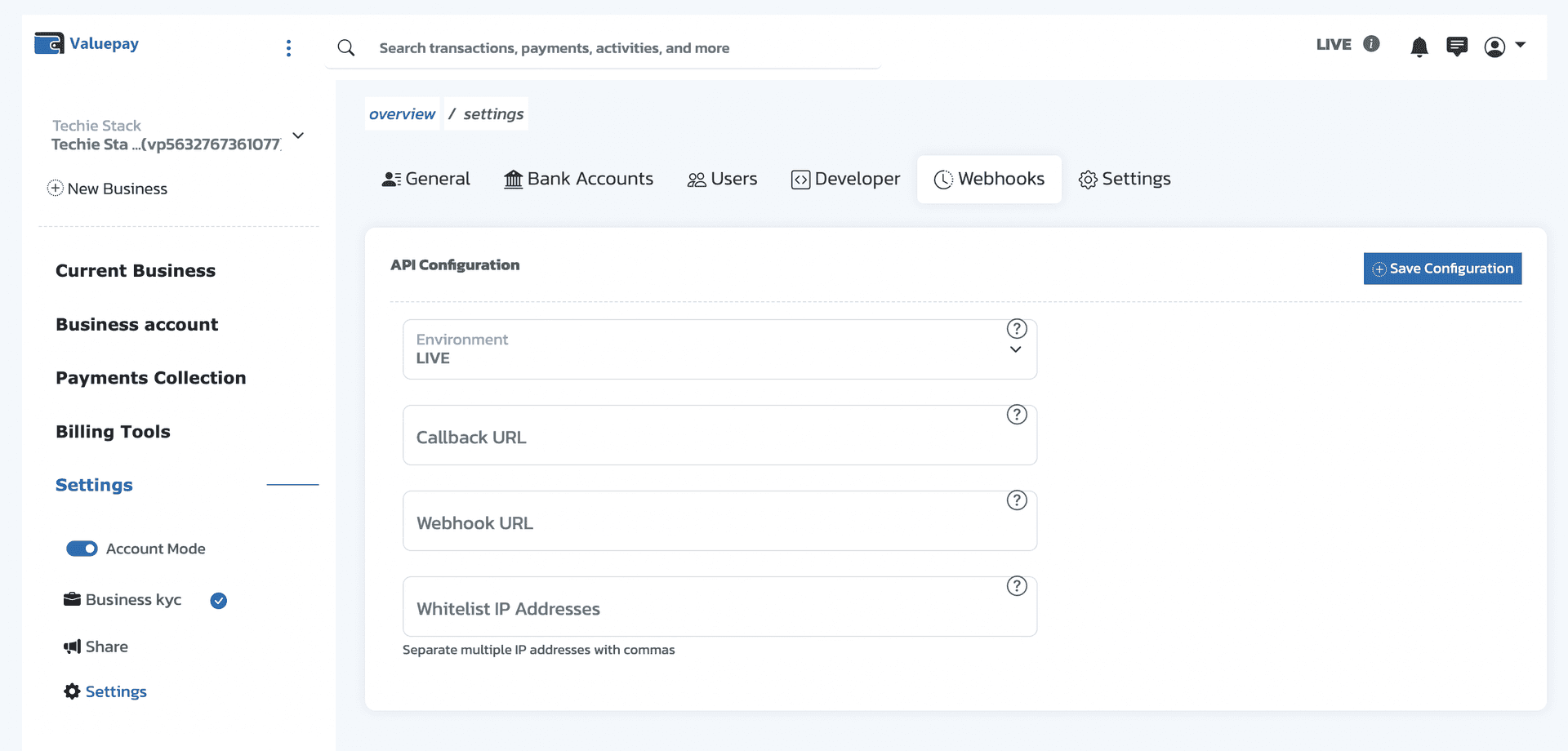
In your merchant dashboard, go to Settings → Developer (or Webhooks) to configure your Webhook URL and Callback URL. The screenshot below shows where to set these:
Events
transaction.created— Triggered when a transaction is initiated.transaction.cancelled— Triggered when a customer cancels a transaction.transaction.aborted— Triggered when a customer fails to complete payment or the transaction window has expired (default: 1 hour after initiation).transaction.failed— Triggered when a transaction fails.transaction.completed— Triggered when a transaction completes successfully.
Payload
The webhook payload contains detailed transaction information. Below is an example payload structure. The history array contains timeline entries with action, actionType, message, performedAt, _id, and id fields.
{
  "event": {
    "type": "transaction.completed",
    "status": "COMPLETED",
    "eventId": "b28078a4-52ea-47e6-9507-c6084876f501-transaction.completed-1763813684635"
  },
  "merchantId": "vp6111425176234",
  "accountId": "vp8565899004329",
  "valueRef": "2c57b26f2a48ff8d0aa315467d3165c0",
  "transactionRef": "vp_9628966671181763813671513",
  "status": "COMPLETED",
  "type": "default",
  "redirectUrl": null,
  "paymentOption": "card",
  "channels": [],
  "usage": "LIVE",
  "currency": "NGN",
  "amount": 2030.46,
  "fees": 28.42644,
  "metaData": {
    "customer_mac": "1901926064",
    "linkId": "123345"
  },
  "transactionCharge": 0,
  "transactionGatewayResponse": null,
  "customer": {
    "email": "john.doe@gmail.com",
    "firstName": "John",
    "fullName": "John Doe",
    "id": "f6eece1e-19ec-44c9-b687-cc70724bf439",
    "lastName": "Doe",
    "phone": "+2349034313685",
    "status": "Active"
  },
  "mandate": {
    "authToken": "7b7f237d4981305b4f35ec2865796156",
    "bin": "539983",
    "last4": "4495",
    "paymentId": "2291850465",
    "expiryMonth": "08",
    "expiryYear": "2026",
    "bank": "GTBank Plc",
    "brand": "MASTERCARD",
    "accountName": "",
    "channel": "card",
    "reusable": true,
    "id": "b5679d67-5ff3-4c6b-8921-a4b726cd9b87"
  },
  "refunded": false,
  "chargedbacked": false,
  "completedAt": "2025-11-22T12:16:41.437Z",
  "plan": null,
  "history": [
    {
      "action": "String",
      "actionType": "success",
      "message": "String",
      "performedAt": "2025-11-22T12:14:44.703Z",
      "id": "6921a936352006ee42cc4353"
    },
  ],
  "createdAt": "2025-11-22T12:14:44.635Z"
}
Signature Verification
To verify the authenticity of a webhook:
- Retrieve the
x-signatureheader from the webhook request. - Generate a signature using the raw payload body and your encryption key (secret) with HMAC-SHA256.
- Compare the generated signature with the
x-signatureheader. If they match, the webhook is authentic.
const crypto = require('crypto');

                const payloadStr = JSON.stringify(payload); // use raw request body
                const signature = crypto
                  .createHmac('sha256', secret)
                  .update(payloadStr)
                  .digest('hex');

                // Compare signature with req.headers['x-signature']
Retry Logic
To ensure reliable delivery, the webhook system implements the following retry mechanism:
- Initial Attempt: Sent immediately upon the event.
- Retry Attempts: Up to 3 retries with a 10-second delay if the initial attempt fails.
- Extended Retries: Up to 5 additional retries with a 30-minute delay if the first 3 retries fail.
- Acknowledgment: After 8 failed attempts, the webhook is acknowledged and no further retries are attempted.
- Timeout: Each webhook request has a 60-second timeout.
Implementation Notes
- Idempotency: Use the transaction ID (or
event.eventId) to handle duplicate webhooks idempotently. - Security: Ensure your webhook endpoint uses HTTPS and validates the
x-signatureheader before processing.
Example Webhook Handler (Node.js)
const express = require('express');
                const crypto = require('crypto');
                const app = express();

                app.use(express.json());

                app.post('/webhook', (req, res) => {
                  const signature = req.headers['x-signature'];
                  const secret = process.env.VALUEPAY_ENCRYPTION_KEY; // Retrieve from secure storage
                  const payloadStr = JSON.stringify(req.body);
                  const expectedSignature = crypto
                    .createHmac('sha256', secret)
                    .update(payloadStr)
                    .digest('hex');

                  if (signature !== expectedSignature) {
                    return res.status(401).send('Invalid signature');
                  }

                  const { event, transactionRef, status } = req.body;
                  // Process webhook (e.g. update order, send confirmation)
                  console.log(event.type, transactionRef, status);

                  res.status(200).send('OK');
                });
Best Practices
- Secure Endpoint: Use HTTPS and validate signatures to prevent unauthorized access.
- Idempotent Processing: Store processed event IDs to avoid duplicate processing.
- Monitor Failures: Log and monitor failed webhook deliveries for quick resolution.
- Test in Sandbox: Use the test environment to validate webhook integration before going live.
ON THIS PAGE
© Copyright 2026